Note:
As of July 29, 2026 this now works for "PractiScore 2.3.11+313 iPhone 26.5 at May 23, 2026 13:12," however, I have not yet had the chance to update the videos below with the most recent PractiScore changes, but just ignore that; everything else is pretty accurate.
If you already know how to use this just enter the URL.
If you don't know how to use this continue reading. (TL;DR)
Why would you want to use this?
Well, it will turn SEIPS scores that are generated by PractiScore and look like this,
(As you watch the video notice that clicking on items does nothing, and that as the page moves up the table headings scroll off the page. Sorry, no audio.)
into scores that look like the following, which allow row selection and keeps the table headers in view as you scroll down the page.
(As you watch the video notice that rows are highlighted as the mouse is moved and that clicking on an item in a row will select that row. Also, the table headings remain in view as a the page moves up. Again sorry, no audio, the producer was on vacation.)
Changes you'll see
When viewing the scores, hovering over a row will highlight that row. If you click on that row, like that for your scores, the row takes on a brighter yellow background so you can then scroll to the right to follow your scores. You can still hover over other rows and this might be useful when you're trying to compare your scores to someone else's.
Another feature of this is that as you scroll down a page that has a lot of shooters, the table headings will remain visible, making it possible to identify what stage the scores belong to as well as what each number means.
Now, this is not perfect. There may be some match scores that don't translate well, but it should be better than what PractiScore provides.
First, in your browser go to the scores' page of interest on the SEIPS website.
For example, from the "Score Archive" page I selected the "Defensive Pistol 6-11-2025" match, then "Combined" scores from that page.
Your browser will have the web address (URL) in the address bar.
Highlight that by selecting it with your mouse, then copy it using Ctrl-c on your PC or Cmd-c on your Mac. To easily select the complete address, which may be long and partially hidden, simply double-click on it, then copy it.
Here's the URL for that particular match. https://seips.org/scores/action/081821/results/matchCombined.html
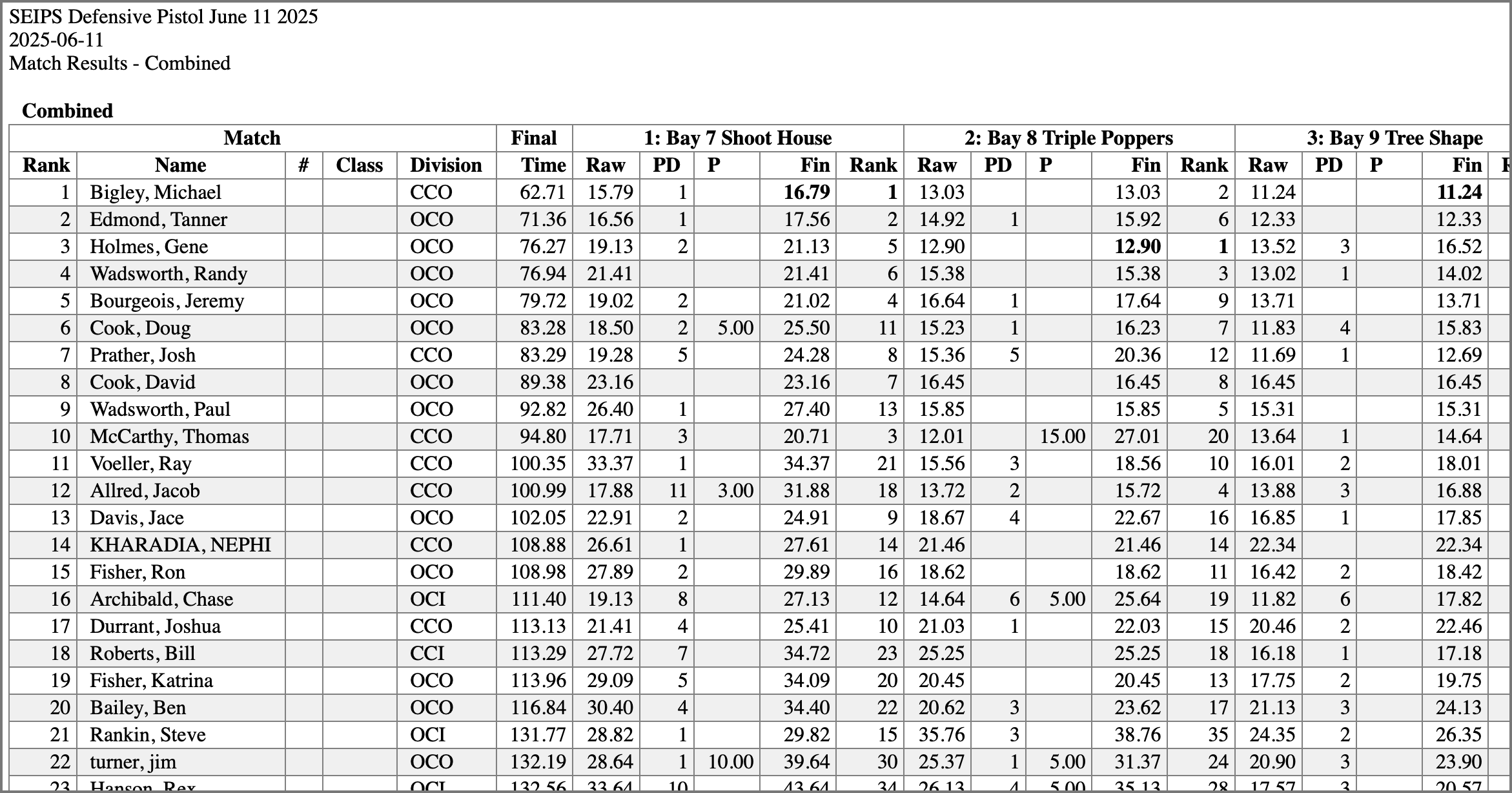
The screenshot below show what that page looks like. Notice that in a normal-sized browser window the table is too wide and scrolls off the screen to the right. Good luck trying to follow a row to the right; It is very difficult to keep track of that row. Also, as shown in the videos above, as you move down the page the table headings will go off of the page so at that point you can no longer tell what the numbers mean.
Second, return to this page and paste (using Ctrl-v for PCs, or Cmd-v for Macs) that URL into the field below. The example URL is already in there so you can quickly see the results.
And finally, select "Submit" and if you did everything right you'll see the scores after being processed by this site.
Now that you know how to use this the next time you can simply enter the URL at the top of this page where it says "If you already know how to use this just enter the URL."
Background Info
I built this site because the match scores created by PracticScore and displayed on the SEIPS site are very difficult to make sense of particularly if you're trying to view your times for each of the stages. For some scores, the table is so wide that it requires scrolling to the right to see your scores. When you do this it's not easy to keep track of the row your're interested in, which is probably yours. Also, if the scores contains a lot of rows, you may need to scroll down to find your scores. When you do this the table headings scroll off the page so even if you can keep track of your row, the headings are no longer visible so the numbers have no meaning. This site will allow you to view the scores for a match that makes it easy to keep track of your row, and, it keeps the tables headings visible so that you can see what the different numbers mean.
I wrote most of this code in 2022 and it worked for USPSA and Defensive Pistol. I've updated it for PracticScore v2 and expanded it so that it also works for Steel Challenge, IDPA, ICORE, Carbine Match, PCC, and Rimfire Challenge.
Notes, July 2026
Updated for "PractiScore 2.3.11+313 iPhone 26.5 at May 23, 2026 13:12." (Really? That's ridiculous. What's wrong with a simple version number?)
This works pretty well for Defensive Pistol, USPSA, Steel Challenge, IDPA, ICORE, Carbine Match, PCC, and Rimfire Challenge.
This isn't perfect because the code produced by PractiScore is terrible and often differs for each shooting sport. As a result it was necesssary for me to write different code for each, making it difficult for me to generate consistent results. If PractiScore changes their code, again, maybe even making it valid, this may produce strange results. Bottom line is that what this site produces is likely to change (i.e. break), but it's better than what PractiScore gives. It worked just fine yesterday but if you run across an issue just let me know.
Planned improvements:
Have borders in the headings to more clearly identify the columns. Normally that should be easy, but it wasn't because of the sticky headings. I'll continue to work on it and whatever else I don't like.
Get the shooter's name column to remain on the page as you scroll to the right.
Disclaimer
Use this if you want. No warranties whatsoever. No refunds. You must be 18 years old or older to use this site.
This converts the PractiScore-generated scores into something that is actually useful. Just enter the URL of the scores' page that you want to fix into the input box below, then select the Submit button.